
9.1.2. Middleware
All the middleware solutions described in this section are not specific to the dVRK, i.e. they can be applied to all cisst/SAW components.
9.1.2.1. ROS
The simplest way to write an application for the dVRK is to use ROS.
The dVRK ROS node dvrk_robot dvrk_console_json exposes most of the
dVRK features as topics.
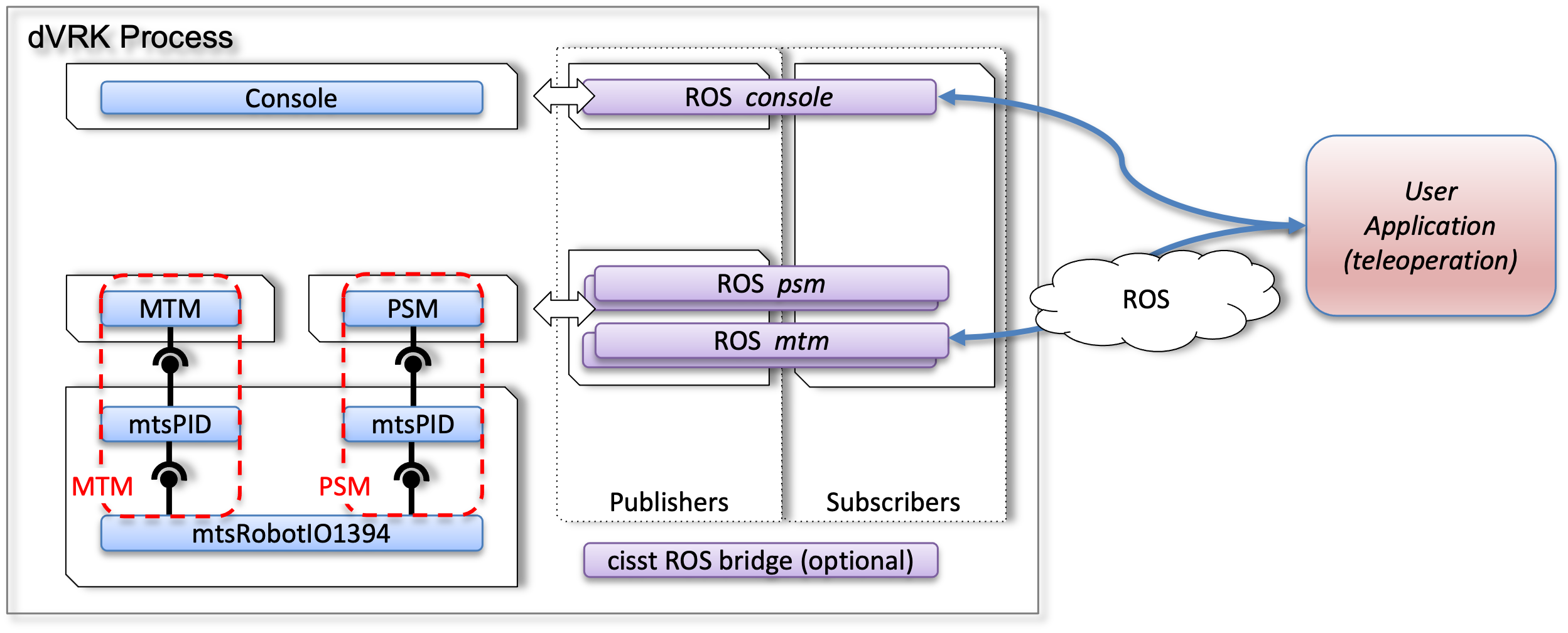
Using multiple processes with ROS
Pros
There is no need to understand the internal dVRK components nor learn anything about the cisst libraries
For your ROS node, you can use any programming language ROS supports, C++, Python, Java…
If you’re using either Python or Matlab, we also provide some libraries to simplify your code:
CRTK Python client: https://github.com/collaborative-robotics/crtk_python_client
CRTK Matlab client: https://github.com/collaborative-robotics/crtk_matlab_client
Your application will be a different process. It can even run on a different computer, so the computing load will not impact the dVRK console. This might actually be a required if your application is very CPU or IO intensive.
Since you’re using ROS, you can
rosbageverything for further data analysis. You can also use tools such as RViz and PlotJuggler to debug your application.
Cons
Since ROS is a middleware, there is a performance cost due to the serialization, sending and de-serialization of your messages. The cost is somewhat relative, specially with modern computers. In our experience, this drawback is not prohibitive for most applications:
You can still close a control loop at 500Hz or more if your client is written in C++ or Python. Matlab might not be able to sustain frequencies that high. You can use rostopic hz to monitor the frequency at which topics are published.
There is also some added latency but mostly likely under a millisecond for most messages. We paid special attention to use ROS messages with a header, so you also can rely on the
timestampto figure out when the data was generated.
Notes
By default, the dVRK console publishes both synchronous (events) and asynchronous data (state data). Events (such as
operating_stateare published as fast as possible. State data (such asmeasured_js…) is published periodically. By default, the dVRK console publishes data at 100Hz (10ms). This can be increased using the-pcommand line argument. The dVRK arm components are running at 1.5KHz, so it doesn’t make sense to publish at any rate higher than 1.5KHz.We provide a full fledge dVRK client API for both Python (
import
dvrk
) and Matlab (dvrk.). These are very convenient for quick testing and sending commands from an interactive interpreter, but they come at a cost. To provide all the possible features, these dVRK clients have to subscribe to all the dVRK topics and this will definitely slow down your interpreter. This is specially true for the Matlab client. You can look at thedvrk_bag_replay.pyexample in thedvrk_pythonpackage (https://github.com/jhu-dvrk/dvrk_python) to see how to use thecrtk.utilsto configure your client to use only the topics you need.
9.1.2.2. Sockets (JSON), OpenIGTLink
ROS is the preferred middleware, but we also support UDP socket with JSON messages and OpenIGTLink.
Sockets with JSON
One of the drawbacks of ROS is that it is hard to install on Windows or macOS. If your application can’t easily run on Ubuntu, for example Unity for HoloLens, you can use the sawSocketStreamer. This cisst/SAW component can be dynamically loaded and configured to connect to any cisst/SAW component to:
Get data from the dVRK
Send commands to the dVRK
All the messages are serialized in JSON. This way you can use any existing JSON parser to serialized/deserialize the messages. These messages are also somewhat human-readable, so it makes debugging easier. The main drawbacks of the text based serialization are the computing coast and lost of accuracy for floating point numbers. We found that in most cases, the ease of integration outweighs these drawbacks.
To use the sawSocketStreamer, clone the repository in your ROS
workspace, under src/cisst-saw`. Note that the
sawSocketStreamer can run along ROS 1 and ROS 2. You can then build
it using catkin build (ROS 1), colcon build (ROS 2) or with
CMake/make.
Once you have the sawSocketStreamer compiled, you will need at least
two files. The first file is used to tell the dVRK console which
components should be dynamically created (by the cisstMultiTask
component manager). The command line parameter to indicate which
component manager configuration files need to be used is -m. You
can use multiple -m options. The second file is a configuration
file for the sawSocketStreamer component itself. It is used to
specify which command to bridge (using the name and payload type).
You can find some examples of configuration files, usage and a simple
python client for the dVRK in share/socket-streamer
(https://github.com/jhu-dvrk/sawIntuitiveResearchKit).
OpenIGTLink
We also implemented an OpenIGTLink (https://github.com/openigtlink/OpenIGTLink) bridge for cisst/SAW components: sawOpenIGTLink. The main application for IGTL is Slicer3D (https://www.slicer.org). If you use ROS 2, you might also consider the SlicerROS2 module (https://slicerros2.readthedocs.io).
The main difference between sawSocketStreamer and sawOpenIGTLink is that we use the OpenIGTLink sockets and serialization instead of UDP with JSON. You will need to use OpenIGTLink (C++ or Python) on the end-user application side to receive/send messages.
You can find some examples of configuration files for the dVRK in
/share/igtl (https://github.com/jhu-dvrk/sawIntuitiveResearchKit).