9.1.3. cisst/SAW components
Instead of using a middleware and implement the end-user application’s logic in a separate process, you can also add cisst/SAW components, either existing ones or your own, to the dVRK console. This is actually the mechanism we use for the ROS (1 and 2), sawSocketStreamer and sawOpenIGTLink described above. The main advantage of this approach is performance, i.e. the communication between components doesn’t require any serialization/de-serialization nor sockets. cisstMultiTask also provides non-blocking and thread-safe communication mechanisms between threads, so you can take advantage of modern CPUs with multi-cores.
9.1.3.1. Derived components
Since the dVRK stack relies on cisstMultiTask components (see tutorial), one can technically replace any existing component by their own. It’s possible but not necessarily easy nor the best approach. If your changes are modest, it might be easier to start from the existing component and alter it. The best way to do so is to derive from the default dVRK class. The main advantages of derived classes are:
All the interfaces (provided and required) the console expects are already defined, so the console can connect the existing ROS bridge (1 or 2), Qt widget, PID, IO, etc.
All the existing configuration parameters will still be there, so you can re-use them.
The code related the component creation is already defined in the base class, so you’ll have less code to manage.
As of 2023, the dVRK console supports derived classes for the arm and the PSM teleoperation. You can find documented examples for:
Derived
mtsTeleOperationPSMinexamples/derivedTeleOperationPSM(https://github.com/jhu-dvrk/sawIntuitiveResearchKit). This example hows a single derived C++ class.Derived
mtsIntuitiveResearchKitPSMinexamples/derivedPSMQtROS(https://github.com/jhu-dvrk/sawIntuitiveResearchKit). This example shows a derived C++ class as well as a custom Qt Widget and ROS bridge (ROS 1) so one can communicate with the derived class with custom messages.
9.1.3.2. Generic components
Alternative hardware
The dVRK console also supports generic arms, i.e. one can use a different type of hardware as long as there is a cisst/SAW component for it and the component has a provided interface that matches the dVRK arm it is meant to replace. We’ve successfully integrated some alternate for the MTM:
Sensible Phantom Omni using sawSensablePhantom (https://github.com/jhu-saw/sawSensablePhantom): The Omni doesn’t provide a gripper so when used with the default dVRK teleoperation, the jaws are ignored. The two buttons on the stylus can be used to emulate the dVRK foot pedals for “operator present” and “clutch”.
ForceDimension haptic devices and Novint Falcon using sawForceDimensionSDK (https://github.com/jhu-saw/sawForceDimensionSDK): The ForceDimension devices offer different features based on the model. We only tested models with 7 degrees of freedom, i.e. position, orientation and gripper. If the orientation is motorized, it can be used like a da Vinci MTM, and we can enforce that the MTM orientation matches the PSM orientation. ForceDimension devices don’t have buttons so we either have to use a USB foot pedal or the GUI for “operator present” and “clutch”. The Novint Falcon is not as useful for real applications since it doesn’t have a wrist, but it can be used for simple demos and debugging. See example of configuration file
jhu-dVRK-Si-demo/console-Novint-Falcon-PSM1-Teleop.json(https://github.com/dvrk-config/dvrk_config_jhu).
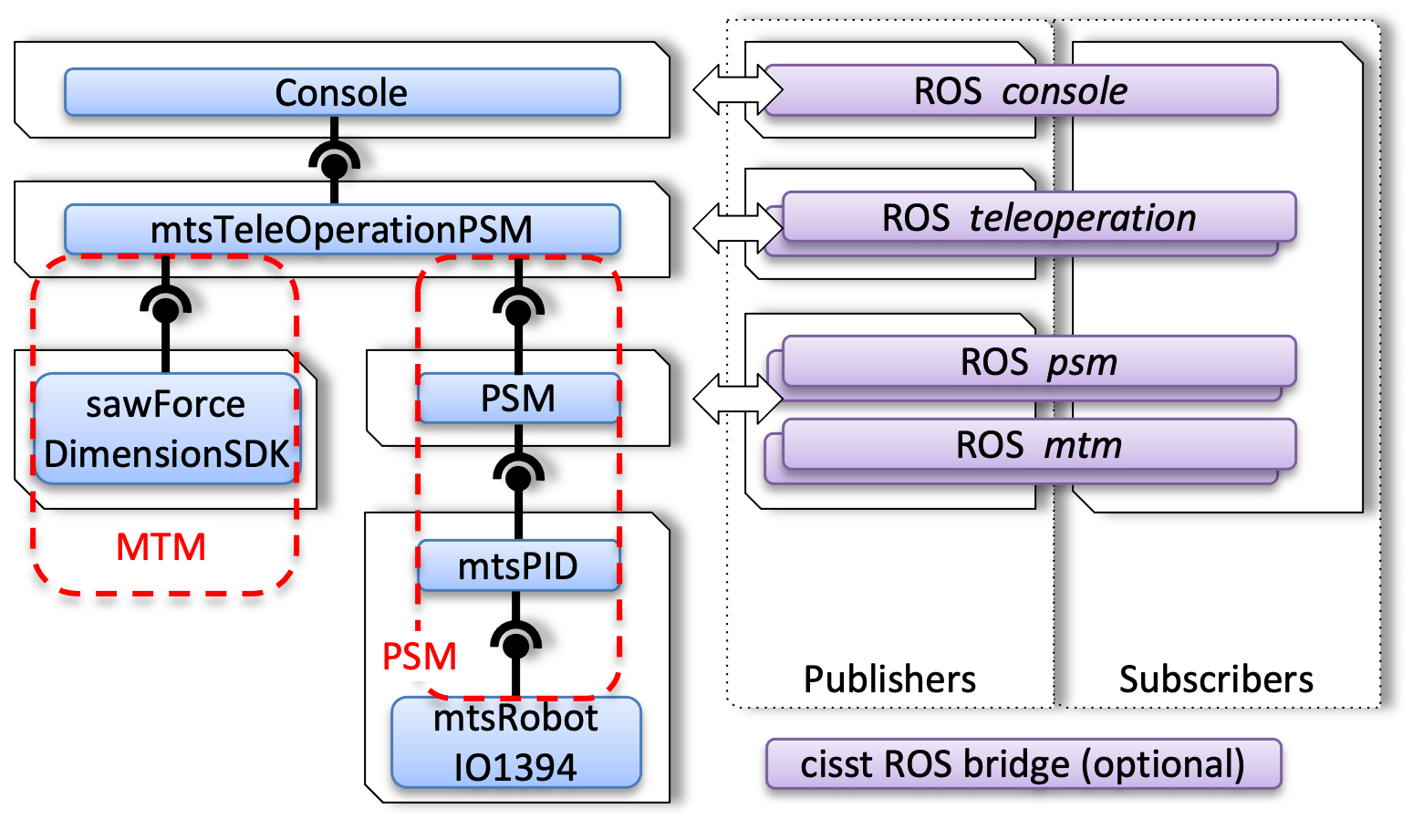
Using an alternate component
ROS component
The ROS component dvrk_arm_from_ros can be treated as an example
of alternate hardware. When used, the console uses ROS to communicate
with a generic arm (e.g. PSM or substitute). This can be used if you
need your teleoperation to work across the network. The black
diagram shows the “PSM over ROS” coming from an actual dVRK but could
be any other device as long as the ROS topics are the same.
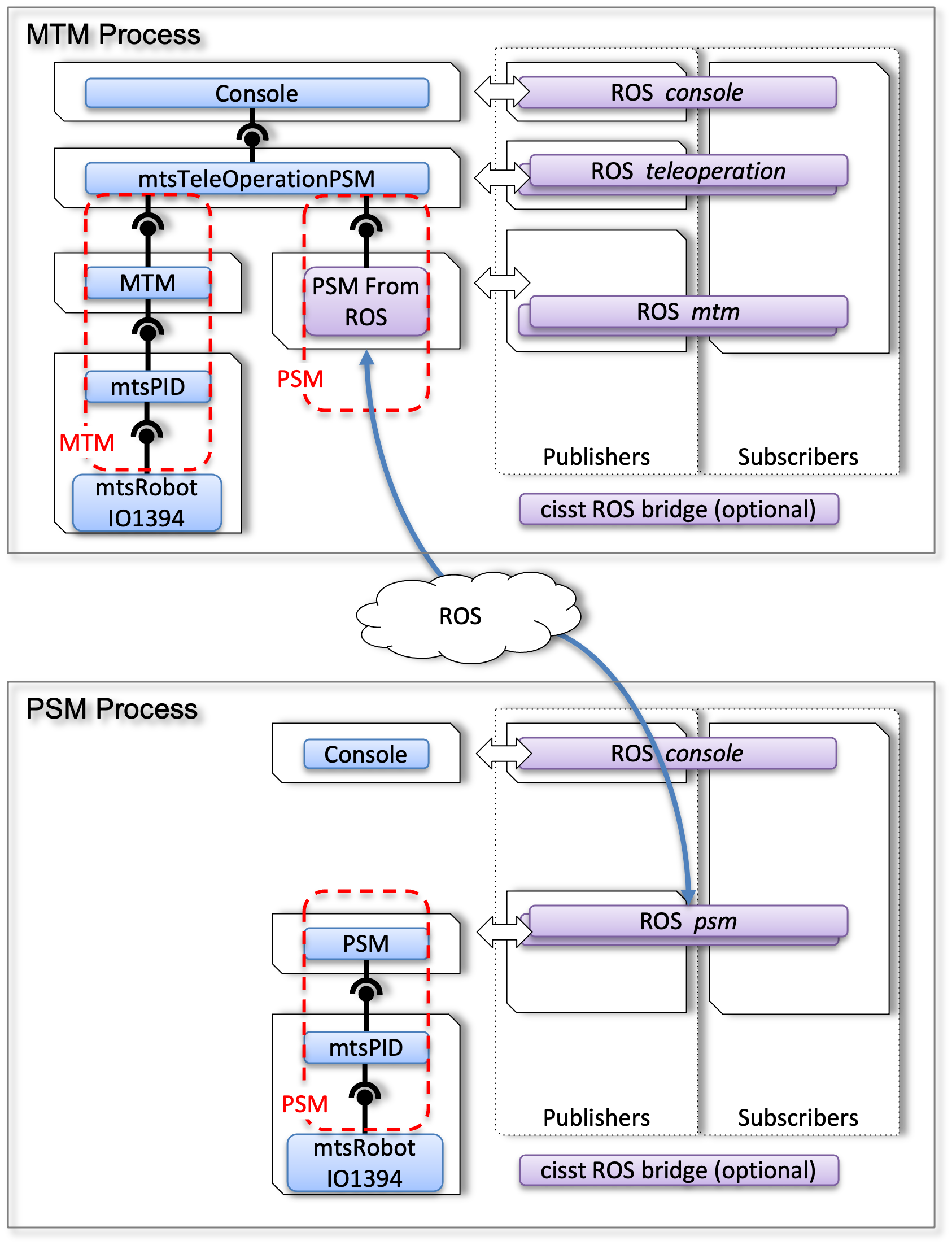
Using a ROS bridge component
In this example, let’s consider how the mtsTeleOperationPSM (MTM Process) sends a servo_cp to the actual PSM (PSM Process):
The teleoperation component in the MTM Process calls the write function (servo_cp) from its required interface for PSM
The PSM from ROS component receives the servo_cp command over its provided interface emulating a PSM. When the command is dequeued:
The payload is converted from a cisst data type to ROS
The PSM from ROS component publishes the ROS pose on the topic
/PSM/servo_cp
ROS passes the message along (ROS cloud in the figure above)
The ROS PSM bridge in the PSM Process subscribes to the topic
/PSM/servo_cp. In its callback:The ROS message is converted to a cisst data type
The bridge calls the cisst function servo_cp from its interface for PSM
The PSM component dequeues the servo_cp command through its provided interface and can finally execute it on the robot.
Note
This can be a bit hard to debug since mismatch in topic names are
not reported as opposed to dynamically loaded components. You will
likely need to use rostopic list and rostopic info to find
all the existing topics and check which nodes subscribe and publish
to them.
You can find an example of dVRK console configuration file
jhu-dVRK/console-MTML-PSM1_ROS-Teleop.json
(https://github.com/dvrk-config/dvrk_config_jhu).