10.3.6. Collectors
10.3.6.1. Introduction
For most data collections, the simplest solution is to use ROS bags. This allows
users to save most of the internal state of the dVRK logic components. Some
topics are not activated by default, but users can add them using the main
system ROS node: command line options -s, -I or -K. The
topics are also fairly well documented in the API.
Using ROS bags also has a few drawbacks. The main one is that data collection
is asynchronous, i.e. not all the internal states can be saved.
Since the dVRK components all use the cisst/SAW cisstMultiTask library, it is possible to use the functionalities that come with cisstMultiTask to collect data, i.e. the mtsCollectorState and mtsCollectorEvent.
State collectors: internally, components can use a “state table” (class
mtsStateTable) to store their state. State tables are circular buffers containing a short history of the state and are advanced at each iteration (time tic).Event collectors: component that can dynamically create required interfaces to observe events, with (write) or without payload (void).
To manage multiple collectors at once, cisstMultiTask also provides mtsCollectorFactory. The factory can create multiple collectors, state and events, based on user provided JSON configuration files. It comes with a Qt widget and ROS topics for the dVRK system applications.
Note
The collectors are totally independent of ROS and can therefore
be used with both main system applications, node dvrk_robot
dvrk_system and executable sawIntuitiveResearchKitSystem.
10.3.6.2. Configuration
cisstMultiTask comes with a state table collector which can be configured using simple JSON files. The user has to provide the name of the component, the name of the state table in the component (usually “StateTable”) and the name of the signal (i.e. data in the state table).
Sampling can be used to skip some data over time. If sampling is set to one, all states are saved. If sampling is set to 5, 1 out of five states will be collected.
{
   "state_collectors":
   [
      {
         "component": "MTML",
         "tables":
         [
            {
               "sampling": 5,
               "table": "StateTable",
               "signals": ["measured_cp", "gripper/measured_js"]
            }
         ]
      }
      ,
      {
         "component": "PSM1",
         "tables":
         [
            {
               "sampling": 1,
               "table": "StateTable",
               "signals": ["measured_cp", "jaw/measured_js", "kin/measured_js"]
            }
         ]
      }
   ]
}
For the event collector, users can specify either:
A component: in this case, all provided interfaces and their events will be collected (
component)A component and a list of provided interfaces: in this case, all the events from the interfaces listed will be collected (
interfaces)A component, interfaces and lists of events: in this case, only the events listed will be collected (
events_writeandevents_void)
 {
   "event_collectors":
   [
      {
         "component": "PSM1",
         "interfaces": [
             {
                 "name": "Arm",
                 "events_write": ["operating_state", "tool_type", "goal_reached"]
             }
         ]
     }
   ]
}
10.3.6.3. Output
The state table collector monitors the state tables and will dump the data in
chunks when a table is about a third full. The data is saved in a comma
separated text file (CSV) and the content is described in a .desc text file.
/home/anton/ros2_ws/src/cisst-saw/sawIntuitiveResearchKit/share/collection/StateDataCollection-PSM1-StateTable-2025-10-06-13-28-19.csv
2025-10-06-13-28-22 1759771686.1629452705
CSV
,
32
0
32
Data: Ticks
Data: measured_cp.Timestamp:{d}
Data: measured_cp.AutomaticTimestamp:{b}
Data: measured_cp.Valid:{b}
Data: measured_cp.MovingFrame:{str}
Data: measured_cp.ReferenceFrame:{str}
Data: measured_cp.Position.Translation[0]:{d}
Data: measured_cp.Position.Translation[1]:{d}
Data: measured_cp.Position.Translation[2]:{d}
Data: measured_cp.Position.Rotation[0,0]:{d}
Data: measured_cp.Position.Rotation[0,1]:{d}
Data: measured_cp.Position.Rotation[0,2]:{d}
Data: measured_cp.Position.Rotation[1,0]:{d}
Data: measured_cp.Position.Rotation[1,1]:{d}
Data: measured_cp.Position.Rotation[1,2]:{d}
Data: measured_cp.Position.Rotation[2,0]:{d}
Data: measured_cp.Position.Rotation[2,1]:{d}
Data: measured_cp.Position.Rotation[2,2]:{d}
Data: jaw/measured_js.Timestamp:{d}
Data: jaw/measured_js.AutomaticTimestamp:{b}
Data: jaw/measured_js.Valid:{b}
Data: jaw/measured_js.Name.size:{uli}
Data: jaw/measured_js.Position.size:{uli}
The description file provides the path to the CSV file, the data and time of the
collection reference’s time (start time). For each data element, you get the
name and type (d for double, str for string…)
For the event collector, the CSV file contains the description of all the types of events received and sets a type Id for each one. Then each line starts with the time the event was received followed by the event type Id and the payload (if any).
# Date & time        : 2025-10-27-16-35-50
# Total event count : 3
# Data format        : Text (CSV)
#
# TimeEventReceived, Id: 1 Event write: "PSM1::Arm::operating_state(prmOperatingState)",Timestamp:{d},AutomaticTimestamp:{b},Valid:{b},StateprmOperatingState::StateType,SubState:{str},IsHomed:{b},IsBusy:{b}
# TimeEventReceived, Id: 2 Event write: "PSM1::Arm::tool_type(mtsStdString)",-timestamp,-automatic-timestamp,-valid,-data
# TimeEventReceived, Id: 3 Event write: "PSM1::Arm::goal_reached(mtsBool)",-timestamp,-automatic-timestamp,-valid,-data
6.82399955,1,6.823984546,1,1,2,ENABLED,0,0
8.374589916,1,8.374564128,1,1,2,HOMED,1,0
8.375486588,2,0,1,1,LARGE_NEEDLE_DRIVER:400006[..]
8.375498866,1,8.375485771,1,1,2,HOMED,1,0
Note that event’s payload might contain their own timestamp. It corresponds to the time the event was emitted. This timestamp is more precise than the time received and should be used when available.
10.3.6.4. Control
There is a default widget to control all the state and event collectors at the same time.
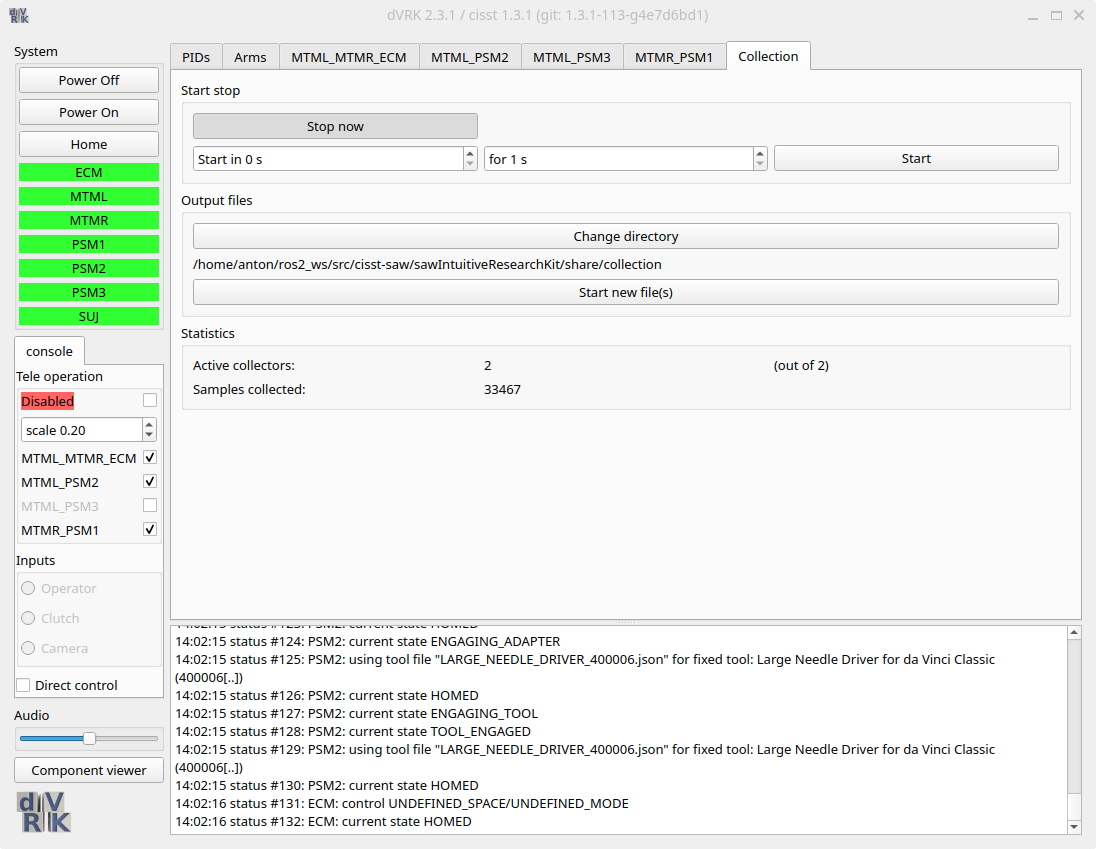
Collector control widget
There are also ROS topics to control the state and event collectors.
10.3.6.5. Drawbacks
One of the main drawback of the state collectors is that not all state data members are stored in a state table, and if they are, they don’t always follow the CRTK naming convention (since they are meant to be internal).
There is also no easy way to list all the components, state tables and signals in the state tables without looking at the actual C++ code. The best approach is to set random names in the state collector configuration file and then check the errors displayed when the system starts. For example, using a non-existing component will lead to:
E- cmnThrow with std::exception (mtsCollectorState::SetStateTable: component "not_a_component" not found in component manager.)
E- Class mtsCollectorFactory: File: mtsCollectorFactory.cpp Line: 121 -  AddStateCollector: SetStateTable failed with error "mtsCollectorState::SetStateTable: component "not_a_component" not found in component manager."
E- Class mtsManagerLocal: File: mtsManagerLocal.cpp Line: 1975 -  Connect: failed to register interfaces for component "", the following component(s) are available: ::QtComponent, ECM, ECM_GUI, ECM_PID, ECM_PID_GUI, ECM_SUJ, LCM_MCC, MCS, MTML, MTML_GUI, MTML_MTMR_ECM, MTML_MTMR_ECM_widget, MTML_PID, MTML_PID_GUI, MTML_PSM2, MTML_PSM2_widget, MTML_PSM3, MTML_PSM3_widget, MTMR, MTMR_GUI, MTMR_PID, MTMR_PID_GUI, MTMR_PSM1, MTMR_PSM1_widget, PSM1, PSM1_GUI, PSM1_PID, PSM1_PID_GUI, PSM1_SUJ, PSM2, PSM2_GUI, PSM2_PID, PSM2_PID_GUI, PSM2_SUJ, PSM3, PSM3_GUI, PSM3_PID, PSM3_PID_GUI, PSM3_SUJ, SUJ, collectors, collectorsQt, collectors_PSM1_StateTable, collectors_PSM1_StateTable::QtComponent, console_widget, system, system_widget, text-to-speech,
The nice thing is that you can find all the existing components in the error messages in the cisstLog-xxx.txt file. Same thing for an incorrect data name (example with type measured_pc instead of measured_cp):
E- Class mtsCollectorState: File: mtsCollectorState.cpp Line: 296 - AddSignal: collector "collectors_MTML_StateTable", cannot find signal "measured_pc". Signals found [ Toc Tic Period PeriodStatistics body_jacobian spatial_jacobian gravity_compensation/setpoint_js measured_cp setpoint_cp local/measured_cp local/setpoint_cp base_frame measured_cs local/measured_cv measured_cv local/setpoint_cv setpoint_cv body/measured_cf spatial/measured_cf kin/measured_js kin/setpoint_js gripper/measured_js ]