5.1.3. ROS 1
Warning
ROS1 itself is not maintained anymore, we strongly recommend to use ROS2. The dVRK support for ROS1 will likely be dropped after release 2.4 (end of 2025).
5.1.3.1. Ubuntu packages
This section assumes you already have ROS installed (see www.ros.org). You will need to install a few more packages for the dVRK software:
Ubuntu 18.04 with ROS Melodic:
sudo apt install libraw1394-dev libncurses5-dev qtcreator swig sox espeak cmake-curses-gui cmake-qt-gui git subversion gfortran libcppunit-dev libqt5xmlpatterns5-dev libbluetooth-dev libhidapi-dev python-vcstool python-catkin-tools
Ubuntu 20.04 with ROS Noetic
sudo apt install libraw1394-dev libncurses5-dev qtcreator swig sox espeak cmake-curses-gui cmake-qt-gui git subversion gfortran libcppunit-dev libqt5xmlpatterns5-dev libbluetooth-dev libhidapi-dev python3-pyudev python3-vcstool python3-catkin-tools python3-osrf-pycommon
Warning
For any dVRK software version greater than 2.1:
Ubuntu 16.04 support has been dropped
Ubuntu 18.04 support requires clang instead of gcc. You will need to install clang with
sudo apt install clangand configure your workspace using:catkin config --cmake-args -DCMAKE_C_COMPILER=clang -DCMAKE_CXX_COMPILER=clang++
5.1.3.2. Catkin workspace, clone and build
If you’re using ROS Noetic and the master branch, you can just
copy/paste the following block of commands in a terminal. For other
configurations, make sure you replace noetic by melodic or
whatever version of ROS you’re using. For the main branches,
replace the version number (e.g. 2.4.0 by main).
# this depends on the ROS version you're using
source /opt/ros/noetic/setup.bash
mkdir -p ~/catkin_ws/src           # create the catkin workspace
cd ~/catkin_ws                     # go in the workspace
catkin init                        # create files for catkin build tool
catkin config --cmake-args -DCMAKE_BUILD_TYPE=Release # all code should be compiled in release mode
cd src                             # go in source directory to pull code
# make sure you use the correct vcs file
vcs import --input https://raw.githubusercontent.com/jhu-saw/vcs/main/ros1-dvrk-main.vcs --recursive
catkin build --summary             # ... and finally compile everything
source ~/catkin_ws/devel/setup.bash
To use a specific release, replace the vcs line with:
vcs import --input https://raw.githubusercontent.com/jhu-saw/vcs/main/ros1-dvrk-2.4.0.vcs --recursive
5.1.3.3. Testing
Environment variables
If you have a single catkin workspace for a given user account, you
might want to automatically source the setup.bash when you log
in. To do so, you should add the following lines at the end of your
~/.bashrc (hidden file in your home directory):
# for ROS
if [ -f ~/catkin_ws/devel/setup.bash ]; then
  . ~/catkin_ws/devel/setup.bash
fi
# for cisst (optional)
if [ -f ~/catkin_ws/devel/cisstvars.sh ]; then
  . ~/catkin_ws/devel/cisstvars.sh
fi
Examples
Use a ROS launch file to start the dVRK in simulated mode with the patient cart only:
source ~/catkin_ws/devel/setup.bash
roslaunch dvrk_model patient_cart.launch generation:=Classic
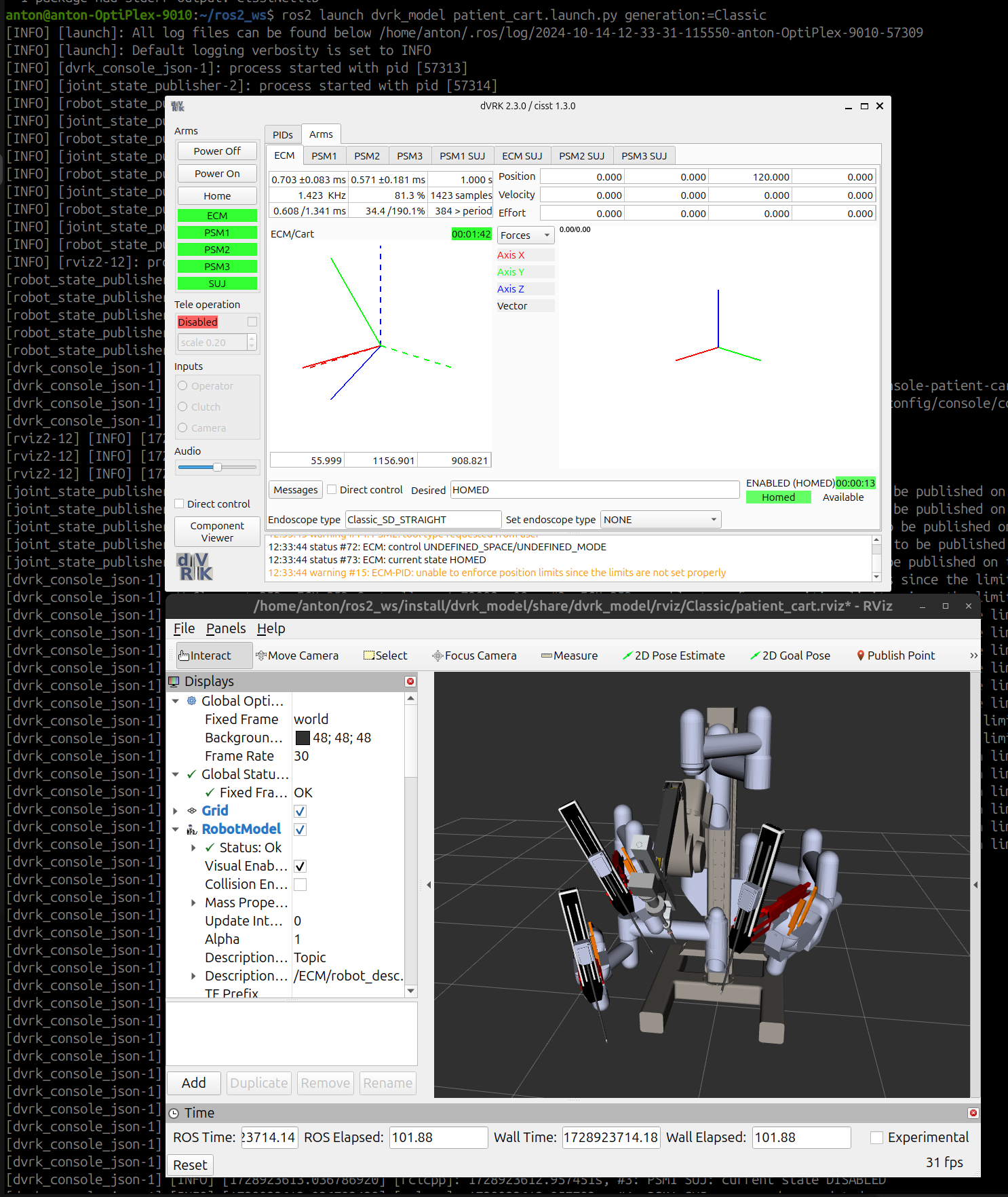
dVRK with Classic patient cart simulated in RViz
In the dVRK GUI, open the Arm PSM1 tab and select an instrument to use.
In a second terminal, use a Python test script to make an arm move:
source ~/catkin_ws/devel/setup.bash
rosrun dvrk_python dvrk_arm_test.py -a PSM1
The main dVRK ROS node is dvrk_system from
the dvrk_robot. This node requires configuration files specific
to your system.
You can also find more launch examples in the Usage/Simulation section.
Notes
Don’t forget to start a
roscoreif you’re usingrosrun.roslaunchwill start aroscoreif needed.Don’t forget to kill our roscore when you’re done. If you’re working on a shared computer, other users will thank you.