9.3. Simulation
This section assumes that you compiled the dVRK software, you don’t need any hardware.
For first time users, we also have some tips.
9.3.1. Kinematic simulation
This section documents how to run kinematics simulation of da Vinci Research Kit (dVRK). It is possible to run the dVRK in simulation mode on any computer as there is no need for a FireWire adapter.
The kinematic simulation mode uses the same software components and configuration files as the real arm except that the PID controller doesn’t communicate with the hardware. Instead, measured position in the joint space are based on the last commanded joint values. This mode allows user to test their code with simple motion commands. In kinematic simulation mode, the dVRK software retains most of the graphical user interface (IO widgets are not available of course) as well as the ROS topics. One can use Rviz to visualize the arms in a virtual environment.
Warning
In simulation mode, there is no way to physically detect which instrument is used for the PSM. You need to open the Arm PSM tab in the GUI and specify which instrument is used. Without an instrument, one can not control the PSM in cartesian space since the kinematic chain is incomplete.
9.3.1.1. Run the simulation
Please see dVRK system for more details. Make sure
you source your ROS workspace’s setup.bash. You can use ROS
launch files for a single arm, a full patient cart or the surgeon’s
console (2 MTMs).
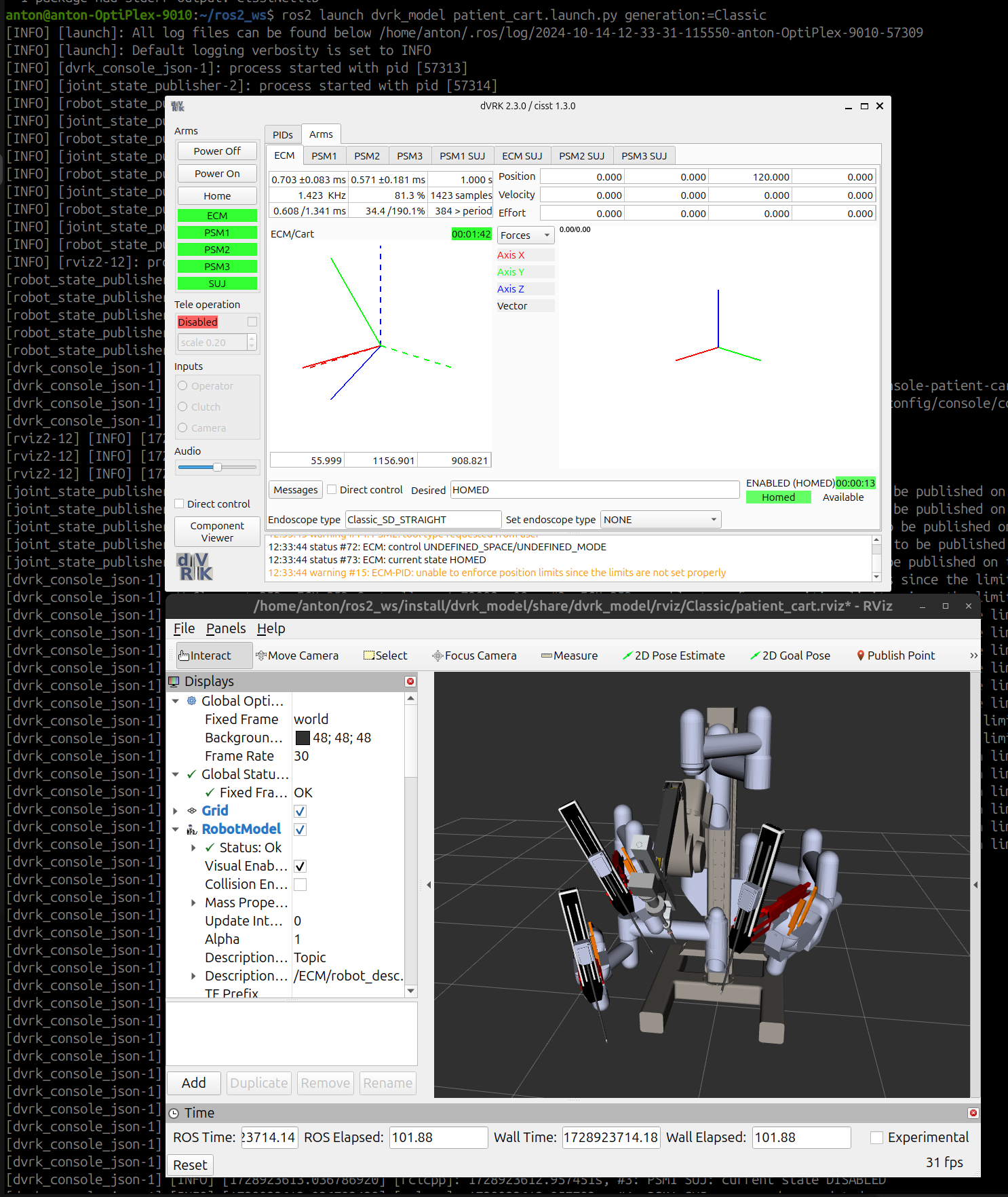
dVRK with Classic patient cart simulated in RViz
Remember, the PSMs can only operate if an instrument is selected in the configuration file, GUI or over ROS topics.
# assuming default ROS2 workspace
source ~/ros2_ws/install/setup.bash

# console and RViz for a single arm: MTML
ros2 launch dvrk_model arm.launch.py arm:=MTML generation:=Classic

# PSM1 Classic
ros2 launch dvrk_model arm.launch.py arm:=PSM1 generation:=Classic

# ECM Si
ros2 launch dvrk_model arm.launch.py arm:=ECM generation:=Si

# Classic patient cart
ros2 launch dvrk_model patient_cart.launch.py generation:=Classic

# S/Si patient cart
ros2 launch dvrk_model patient_cart.launch.py generation:=Si

# dVRK only support Classic MTMs so no need to specify generation
ros2 launch dvrk_model surgeon_console.launch.py
In a second terminal, use a Python test script to make any arm move:
source ~/ros2_ws/install/setup.bash
ros2 run dvrk_python dvrk_arm_test.py -a MTML
You can also start investigating which ROS topics are available using:
source ~/ros2_ws/install/setup.bash
ros2 topic list
Warning
In kinematic simulation mode, some commands are meaningless since there is no IO nor forces measured. The kinematic simulation mode is useful only to test simple scripts using position control. There is no simulation of the interactions between the robots and their environment.
9.3.1.2. Configuration and launch files
The dVRK kinematics simulation uses a simulated low-level hardware class and
reuses the rest of the code including the main ROS node dvrk_robot
dvrk_system, which can run a real or a simulated arm based on a configuration
file in JSON format.
The system example JSON configuration files are located in
sawIntuitiveResearchKit under share/system folder. The
simulated arm configuration files are under share/arm.
9.3.1.3. Usage
Once the simulated dVRK system and RViz are started, you can interact with the robot using the system’s GUI. Besides “Homing” the system, you can also use the arm’s widget with direct control.
You can also communicate with the simulated robot using ROS topics (see dVRK client libraries).
9.3.2. Dynamic simulation
You can run the dVRK software and emulate the dVRK arms and their environment using a dynamic simulator. Dynamic simulation for the dVRK has been used for two main applications:
Simulate the dynamic of the PSM parallel linkage (da Vinci Standard/Classic). This is used mostly to improve control.
Simulate the interactions between instruments and patient. This can be used to simulate surgeries and development training platforms (for humans or ML).
The following repositories offer different implementations:
Isaac Sim: https://github.com/surgical-robotics-ai/isaac-sim-surgical-robotics-challenge
ORBIT-Surgical: https://orbit-surgical.github.io/
CoppeliaSim: https://github.com/marcofer/dynamic-dvrk-coppeliasim-simulator
For any support question, reach out to the developers of each simulator.