10.6.1. Python
10.6.1.1. Introduction
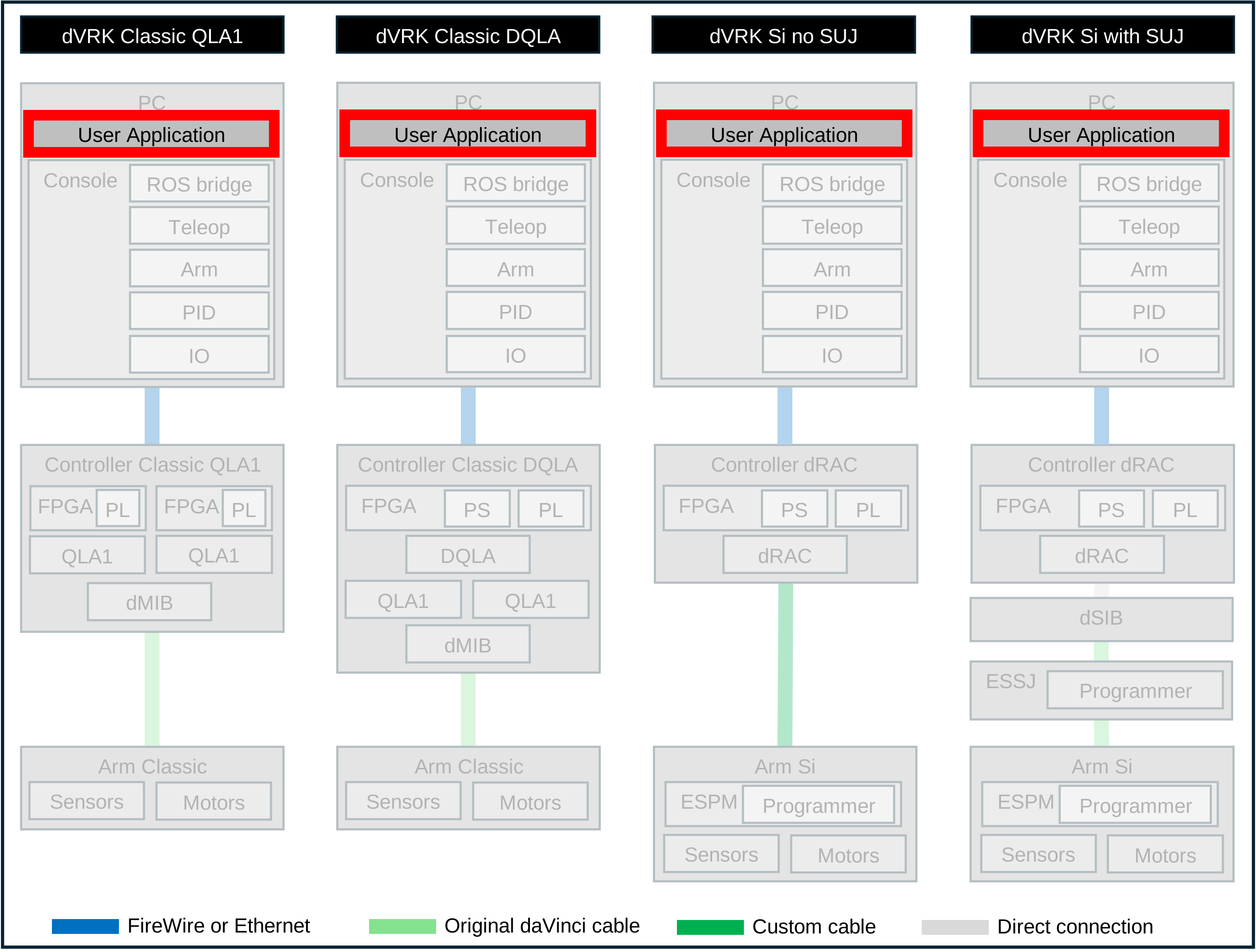
The goal of the dVRK Python package is to enable users to write a simple application in Python that communicates with the dVRK system using ROS as middleware.
If you retrieved the dVRK software stack using the compilation instructions, the dVRK Python package will already be in your workspace. The dVRK Python client libraries are used for most calibrations scripts.
The dVRK Python libraries are based on the CRTK Python client libraries: https://github.com/collaborative-robotics/crtk_python_client. The API follows the CRTK naming convention: https://crtk-robotics.readthedocs.io.
The Python packages main features are:
A ROS version independent API (
crtk.ralfor ROS Abstraction Layer) so you can use the same script for the dVRK with ROS 1 or ROS 2. This can be useful if you’re starting with ROS 1 and plan to move to ROS 2 later or want to share your code with someone using a different version of ROS. The CRTK RAL hides all calls to eitherrospyorrclpy.Wrappers around the ROS Python libraries so the user doesn’t have to deal with creating ROS publishers, subscribers…
Simple classes to interact with the dVRK arms, system, foot pedals… and methods to access most features
Conversion to convenient data types, PyKDL for cartesian data and numpy for vectors and matrices
All methods used to retrieve the robot’s state (measured, setpoint…) return a tuple with both the data (array, frame…) and a timestamp. The timestamp will be set to 0 if the data is considered invalid. For example, cartesian pose for a PSM without an instrument. Proper code should retrieve both and then test the ts, i.e.
p, ts = robot.measured_jp()
if ts != 0.0:
    do_something_useful()
else:
    handle_invalid_data()
But if you don’t want to handle error cases, you can use the
_Python dummy variable name and ignore it:p, _ = robot.measured_jp().
The ROS package dvrk_python contains:
src/dvrkPython module: defines the base classdvrk.armas well as classes for the PSMs, MTMs, ECMs, system, foot pedals… which use the dVRK ROS topics to communicate with thedvrk_systemapplication included in thedvrk_robotROS packagescripts: collection of scripts used to calibrate and test the dVRK as well as examples
10.6.1.2. Usage
You will first need to start the dVRK system application.
ROS 1:
rosrun dvrk_robot dvrk_system -j your_system_config_file.jsonROS 2:
ros2 run dvrk_robot dvrk_system -j your_system_config_file.json
Once the system is running, you can check which arms are available by listing the available ROS topics.
ROS 1:
rostopic listROS 2:
ros2 topic list
You should see one namespace per arm, e.g. /PSM1, /MTML and/or
/ECM… based on your system configuration as well as /console.
Then in Python:
import crtk, dvrk

# create the ROS Abstraction Layer with the name of the node
ral = crtk.ral('dvrk_python_node')

# create a Python proxy for PSM1, name must match ROS namespace
p = dvrk.psm(ral, 'PSM1')

# wait and check until all the topics are connected
# default timeout is 5 seconds
ral.check_connections()

# spin to make sure subscribers callbacks are called
# this is required for ROS 2 and does nothing on ROS 1
# use for portability!
ral.spin()

# now you can home from Python
p.enable()
p.home()

# retrieve current info (numpy.array) with timestamps
p.measured_jp()
p.measured_jv()
p.measured_jf()

# retrieve PID desired position and effort computed with timestamps
p.setpoint_jp()
p.setpoint_jf()

# retrieve cartesian current and desired positions
# PyKDL.Frame with timestamps
p.measured_cp()
p.setpoint_cp()

# move in joint space
# move is absolute (SI units)

# move multiple joints
import numpy
p.move_jp(numpy.array([0.0, 0.0, 0.10, 0.0, 0.0, 0.0]))

# move in cartesian space
import PyKDL
# start position and timestamp (ignored using variable _)
goal, _ = p.setpoint_cp()
# move 5cm in z direction
goal.p[2] += 0.05
p.move_cp(goal).wait()

import math
# start position
goal, _ = p.setpoint_cp()
# rotate tool tip frame by 25 degrees
goal.M.DoRotX(math.pi * 0.25)
p.move_cp(goal).wait()
To apply wrenches on MTMs, start IPython and type the following commands while holding the MTM (otherwise the arm will start moving and might bang itself against the console and get damaged).
# load and define the MTM
from dvrk import mtm
import crtk

ral = crtk.ral('mtm_node')
m = mtm(ral, 'MTML')
ral.check_connections()
ral.spin()

# When True, force direction is absolute.  Otherwise force
# direction defined in gripper/tip coordinate system
m.set_wrench_body_orientation_absolute(True)

# 2N force in y direction
m.body.servo_cf(numpy.array([0.0, 0.0, 2.0, 0.0, 0.0, 0.0]))

# lock the MTM wrist orientation
m.lock_orientation_as_is()

# turn gravity compensation on/off
m.set_gravity_compensation(True)

# turn off forces
self.arm.body.servo_cf(numpy.array([0.0, 0.0, 0.0, 0.0, 0.0, 0.0]))
To access arm specific features (e.g. PSM, MTM, …), you can use the
derived classes psm or mtm. For example from dvrk.psm
import *.
10.6.1.3. Performance
For the dVRK, one can use the classes dvrk.arm, dvrk.psm,
dvrk.mtm… that use the crtk.utils to provide as many
features as possible. This is convenient for general purpose testing,
for example in combination with IPython to test snippets of code.
But, there is a significant performance penalty when using the
dvrk.xxx classes since they subscribe to more topics than
generally needed. For your application, it is recommended to use your
own class and only add the features you need to reduce the number of
ROS messages and callbacks. See examples in the directory scripts,
e.g. dvrk-bag-replay.py.
Warning
By default, the dVRK system publishes the state of the dVRK at 100Hz. If you need to close the loop at a different frequency, use the
-pcommand line option for thedvrk_system.